Online quizzes & exams for schools
Create, run and grade school exams, all in one place.
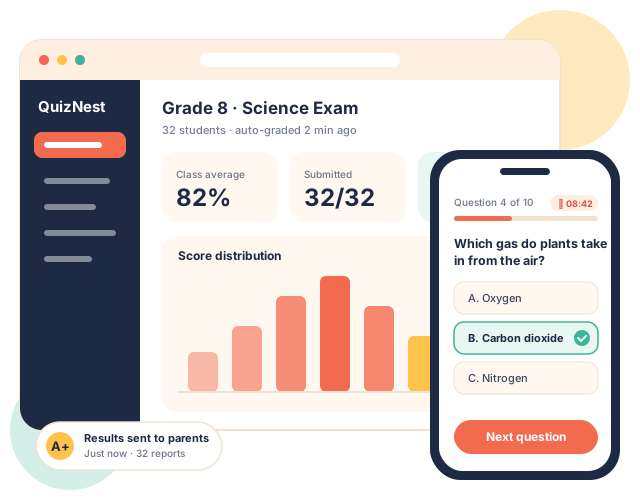
QuizNest gives teachers a question bank and auto-grading, students a simple exam app on any device, parents live progress reports, and admins full control — so your school spends less time marking and more time teaching.
20-minute walkthrough · Free setup help · No commitment
Trusted by 200+ schools
Maple Grove Academy
Riverside High
St. Clara School
Oakfield Prep
Bright Minds Intl.
Why QuizNest
Exams shouldn’t eat your whole week
Paper tests, piles of marking and parents asking “how is my child doing?” — QuizNest replaces all of it with one simple platform.
Printing & collecting papers
Hours spent printing, handing out and collecting test papers.
Publish an exam once — students take it on any device.
Marking every evening
Teachers marking stacks of answer sheets late into the night.
Auto-grading returns scores the moment the exam ends.
Parents in the dark
Parents only find out about results at the end of term.
Parents see scores and progress as soon as they’re released.
Features
Everything you need to run exams online
From a quick class quiz to end-of-term exams for the whole school.

Smart question bank
Build reusable questions — multiple choice, true/false, short answer and more — tagged by subject, grade and difficulty.

Instant auto-grading
Objective questions are marked automatically, with quick rubrics for written answers. Results in seconds, not days.

Timed online exams
Schedule exams for a class, set time limits and open windows, and let students sit them on a laptop, tablet or phone.

Fair & secure testing
Shuffle questions and answers, lock the browser to the exam and flag unusual activity to keep every result honest.

Instant results & feedback
Students see their score and explanations straight away, so every quiz becomes a learning moment.

Clear analytics
Spot the topics a class struggles with, track progress over the year and export reports in one click.
How it works
From question to report card in 3 steps
1
Create your quiz
Pick questions from the bank or write new ones, set the time limit and assign it to a class in minutes.
2
Students take it
Students log in on any device and sit the exam — with a timer, autosave and shuffled questions.
3
Results go out instantly
Scores are auto-graded and shared with teachers, students and parents, with analytics for admins.
Built for every role
One platform, four happy users
Everyone gets their own simple view — no training manuals required.

For teachers
- Build quizzes from a shared question bank
- Auto-grade and add feedback fast
- See who needs help on which topic

For students
- Take exams on any device
- Instant scores with explanations
- Practice quizzes before the real test

For parents
- See results as soon as they are released
- Progress reports by subject
- Reminders for upcoming exams

For school admins
- Manage classes, teachers and students
- School-wide exam calendar
- Reports across grades and subjects
Schools see the difference in the first term
50k+
exams graded
80%
less time spent marking
99.9%
uptime during exams
4.8★
average teacher rating
Loved by schools
What principals, teachers and parents say
★★★★★
We moved every term exam online in two weeks. Teachers got their evenings back and our results came out days earlier.
★★★★★
The question bank is a lifesaver. I build a quiz in ten minutes and the marking is done before the bell rings.
★★★★★
I finally know how my daughter is doing without waiting for parents' evening. The progress reports are so clear.
Security & integrations
Safe for students, easy for IT
QuizNest fits into the tools your school already uses.

Private by design
Student data is encrypted in transit and at rest, never sold, and stays under your school's control.
Role-based access
Teachers, students, parents and admins only see what they should — nothing more.

Daily backups
Automatic daily backups and 99.9% uptime, so exams never stop halfway.
Google Classroom
Microsoft Teams
Google & Microsoft sign-in
CSV / SIS import
Excel & PDF reports
FAQ
Questions schools often ask
Which devices do students need?
Any laptop, tablet, Chromebook or phone with a modern browser. There is nothing to install, and answers autosave if the connection drops.
What question types are supported?
Multiple choice, multiple answer, true/false, fill in the blank, matching, short answer and long written answers with rubrics.
How do you prevent cheating?
Questions and answers can be shuffled per student, exams can be time-boxed and locked to full screen, and teachers see a log of unusual activity.
Can we import our existing students and questions?
Yes. Import students and classes from a CSV or your SIS, and bring in existing question banks from spreadsheets. Our team helps with setup.
How do parents get access?
Parents receive an invite by email or SMS and see only their own child's results, progress reports and upcoming exams.
Is our data safe?
Data is encrypted, backed up daily and never sold or shared. Access is controlled by role, and you can export or delete your data at any time.
What happens in the demo?
A 20-minute video call where we show QuizNest from the teacher, student, parent and admin views, answer your questions and talk through pricing for your school.
See QuizNest in action — in a 20-minute demo
We’ll walk you through the teacher, student, parent and admin views and show how your school could run its next exam online.
Prefer email? Write to hello@quiznest.example